
Nova Scotia HST Is 14%: Is Your Shopify or WooCommerce Store Still Charging 15%?

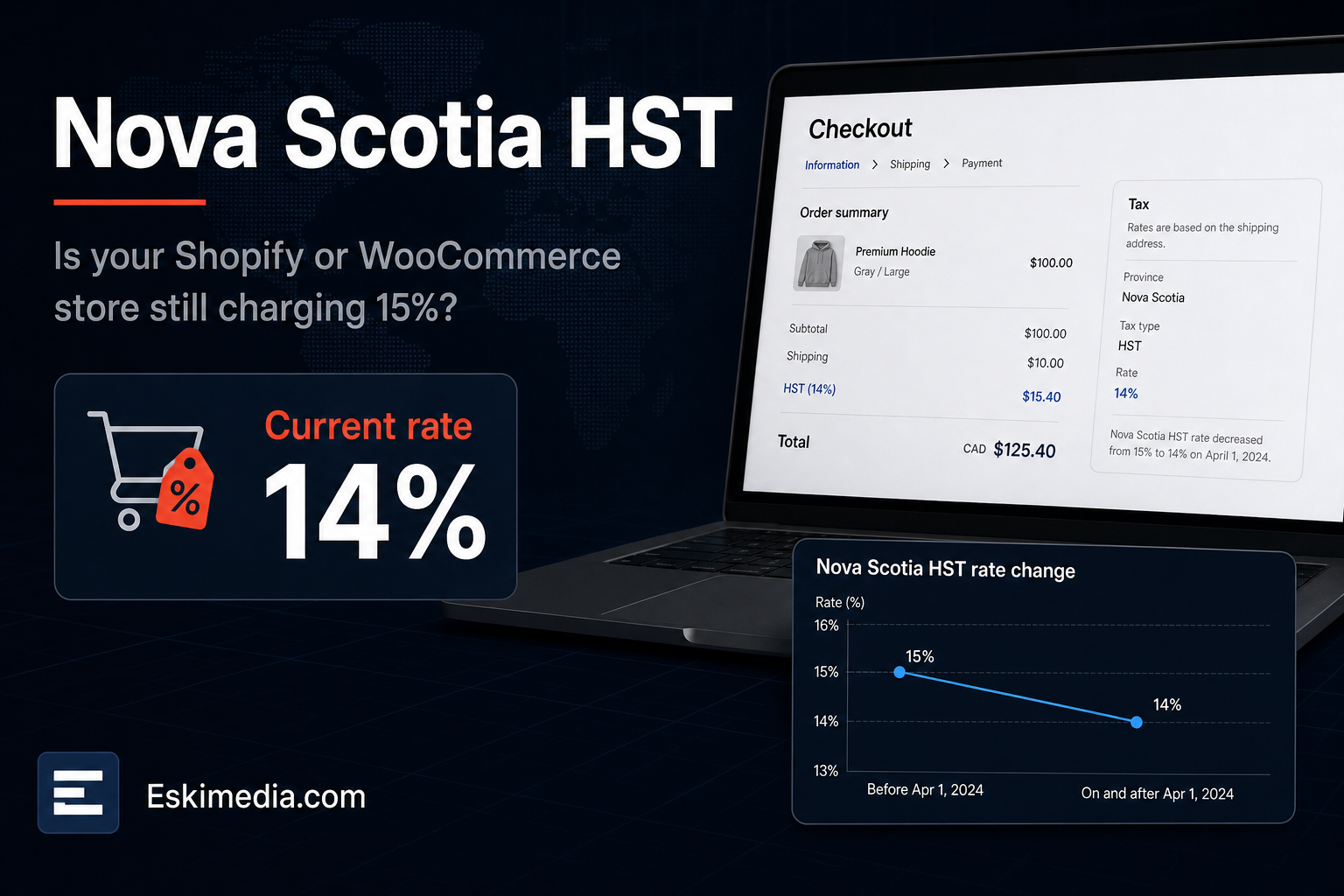
Nova Scotia’s HST dropped from 15% to 14% on April 1, 2025, when the province cut its portion from 10% to 9%. Most online store owners heard about it. Not every store heard about it.
If your store’s tax rates were typed in by hand, it may still be charging Nova Scotia customers 15% today. Shopify stores using automatic tax calculation updated on their own. Stores with manual overrides didn’t. WooCommerce stores with a hand-built tax table almost certainly didn’t, unless someone went in and changed the number.
Checking takes about five minutes. Fixing it takes a couple more. What to do about the extra 1% you’ve already collected is a separate question, and it has a deadline.
The Five-Minute Check
- Open your store in a private browser window.
- Add a product to the cart and go to checkout.
- Enter a Nova Scotia shipping address. A Halifax postal code is fine.
- Look at the tax line. On a $100 taxable item, HST should be $14.00, not $15.00.
- Repeat with a New Brunswick address. It should still show 15%, because New Brunswick’s rate didn’t change.
That second test catches the other common mistake: someone fixes the problem by changing every HST rate to 14%, which undercharges customers in the other Atlantic provinces.
Current HST Rates for Online Sales
For goods shipped to a customer, you generally charge the rate of the province the goods are shipped to, not the province you’re in. The Canada Revenue Agency has the official rate table and place-of-supply rules.
| Province | Rate (2026) |
|---|---|
| Nova Scotia | 14% HST (since April 1, 2025) |
| New Brunswick | 15% HST |
| Newfoundland and Labrador | 15% HST |
| Prince Edward Island | 15% HST |
| Ontario | 13% HST |
| All other provinces and territories | 5% GST (plus provincial sales tax where it applies, which you may or may not need to register for) |
Check CRA’s page before relying on this table. Rates change, as Nova Scotia has just shown.
Fixing It in Shopify
Shopify calculates Canadian taxes automatically once your GST/HST registration is entered, and it keeps up with rate changes. The problem is overrides.
- Go to Settings → Taxes and duties → Canada.
- Confirm your GST/HST number is entered and tax collection is on.
- Look for any tax overrides on Nova Scotia, on product collections or on shipping. An override set to 15% for Nova Scotia before April 2025 will still say 15%.
- Remove the override unless you have a specific reason for it, and let Shopify’s standard calculation apply.
Shopify’s Canadian tax help covers the settings in detail. Then run the checkout test again.
Fixing It in WooCommerce
WooCommerce doesn’t know Canadian tax rates unless you tell it, either through a rate table or an extension.
If you use a manual rate table
- Go to WooCommerce → Settings → Tax → Standard rates.
- Find the row with country code CA and state code NS.
- Change the rate from 15.0000 to 14.0000. Leave NB, NL and PE at 15.
- Check the Shipping column. If shipping is taxable in your setup, the tick should be there for NS just as it is for the others.
- If you have other tax classes, such as a reduced-rate class, check the NS row in each one.
- Save, clear your site cache, and run the checkout test.
If you use an extension
The free WooCommerce Tax extension calculates rates automatically for Canadian stores, based on the customer’s address. If it’s on, the rate should already be correct, but run the test anyway. Some stores have an old manual table as well, and the two can conflict. Other tax plugins vary, so check whichever one you use.
Other Places 15% Hides
The checkout isn’t the only place. Look for the old rate in:
- product pages that display “price including tax” with a hard-coded figure
- quote and invoice templates in your accounting or invoicing software
- your point-of-sale system, if you also sell in person
- payment links and manual invoices sent through Square, Stripe or PayPal
- wholesale price lists and PDFs
What About the Extra 1% You Already Collected?
If your store charged Nova Scotia customers 15% after April 1, 2025, that extra 1% was collected as tax in error. The general rule is that you can’t simply keep it.
Under section 232 of the Excise Tax Act, a business can refund or credit tax charged in error to the customer and issue a credit note, generally within two years of when the tax was charged. The earliest overcharges from April 2025 reach that two-year mark in April 2027. Amounts you don’t refund generally still have to be accounted for to the CRA.
This is where to bring in your accountant. They’ll want a report of Nova Scotia orders since April 1, 2025, with the tax collected on each. Both Shopify and WooCommerce can export that. How to handle it, whether through refunds, credits or reporting, depends on your volumes and how you’ve been filing.
Tax settings are one of those things nobody touches after launch until something changes. If you’d like a second pair of eyes on your store’s tax, shipping and checkout setup, it’s a standard part of our e-commerce work, whether the store is on Shopify or WooCommerce. We also cover what to expect from a new build in e-commerce website design in Halifax. If you’ve run the test and something looks off, send us your store URL.