

There’s a hard drive in most Halifax businesses with several hours of usable video on it. Phone clips from job sites. A conference talk someone recorded. Footage from a shoot two years ago that produced one video and forty minutes of unused material. A folder called “video stuff FINAL” that nobody has opened since.
That’s an asset, and almost nobody treats it like one. The reflex when a business needs video is to book a new shoot, which is the most expensive part of the process, even when the footage they need is already sitting there.
Editing Is Where the Video Gets Made
An uncomfortable truth about video production: the shoot is logistics. The edit is where a watchable video actually comes into existence.
The same three hours of raw footage can become a two-minute brand story, six vertical social clips, a 30-second ad, or an unwatchable eight-minute chronological slog. Nothing about the footage changes. The decisions do: what to cut, where to cut, what to cut to, how the audio is levelled, whether the colour matches between shots filmed an hour apart in changing light.
This is why “we shot it ourselves, can you just clean it up?” is a completely reasonable request, and often the highest-value video work we do.
When Editing-Only Is the Right Call
Genuinely the right answer if:
- You have footage and no finished video. Obvious but worth stating. Raw footage sitting unused has cost you money already.
- You have one video and need six. A recut of existing material into vertical social clips costs a fraction of a new shoot and often performs better, because you’re pulling the strongest moments rather than hoping for new ones.
- Your team already films well enough. Trades and construction businesses are frequently sitting on excellent job-site footage shot on a phone. The footage isn’t the problem.
- Something’s happened that can’t be reshot. A grand opening, an event, a build that’s now finished, a staff member who’s left.
- Your existing video is dated but the content is fine. New graphics, new music, tightened pacing, updated end card. Substantially cheaper than starting over.
When You Actually Need a Shoot
Being honest about the limits, because a good editor will tell you this rather than take your money:
Bad audio can’t be fixed. Improved, sometimes. Fixed, no. If your interview was recorded in a room with a fan running and no external mic, the fan is in the recording permanently. This is the single most common reason we tell someone their footage isn’t usable.
Missing coverage can’t be edited in. If you filmed one continuous take from one angle, there’s nothing to cut to, which means every cut is a jarring jump. Editing needs options.
Severe exposure problems are terminal. Blown-out windows behind a subject, or footage so dark it’s noise, has no recoverable detail. Colour correction works with information that exists in the file.
Vertical footage can’t become horizontal. Or vice versa, without heavy cropping that cuts heads off. Shoot format matters.
If you’re not sure which side of the line your footage falls on, send a sample. Two minutes of watching tells us, and it saves you paying for an edit that can’t work.
How Editing Is Priced
By hours of work, not by minutes of finished video, which surprises people. A tight 60-second cut from messy footage can take longer than a five-minute video from clean, well-organized material.
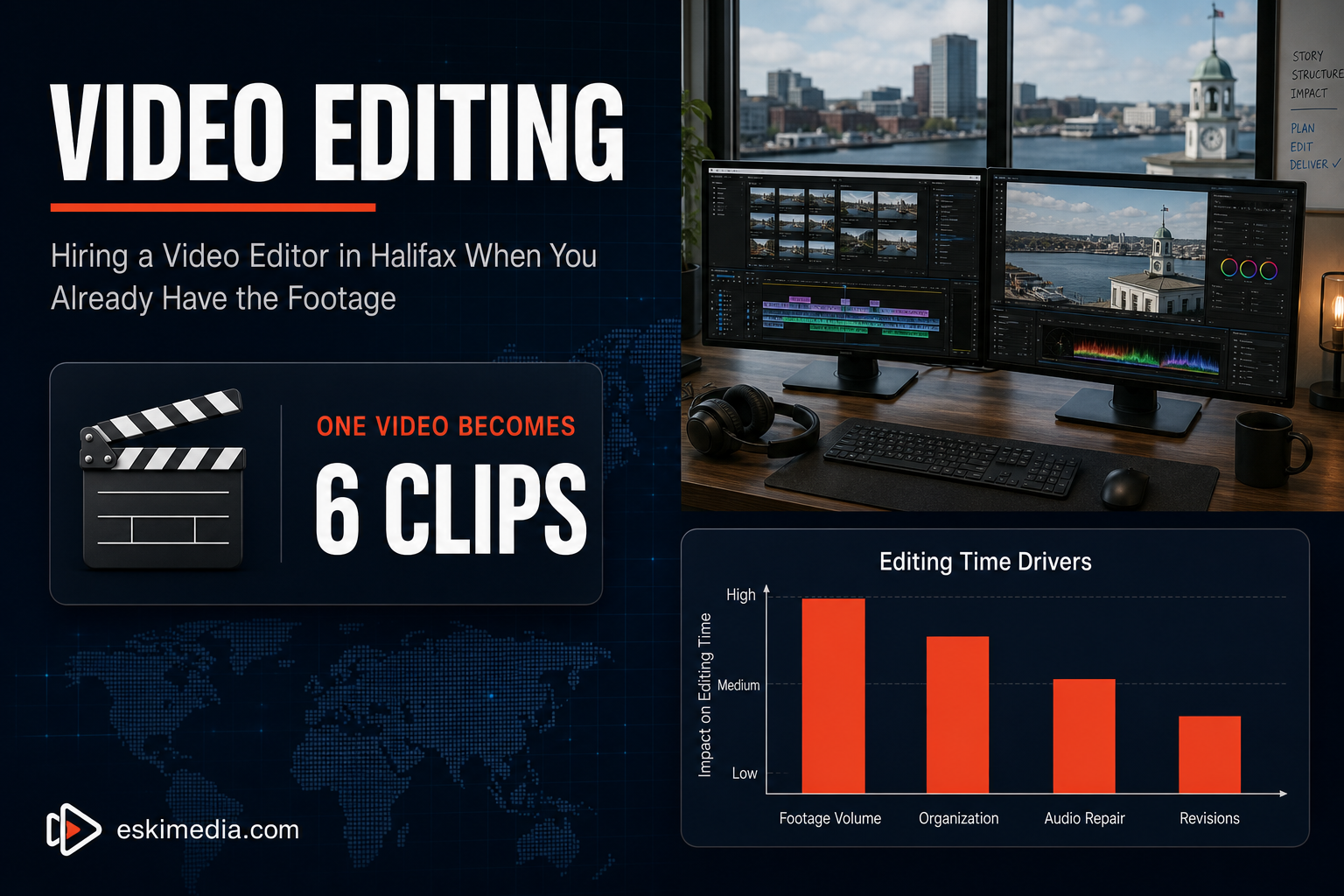
The things that drive editing time up:
- Volume of raw footage. Someone has to watch all of it. Three hours of material means three hours before any editing starts.
- Organization. Clearly named files from one camera is fast. Four devices, three frame rates, no naming, “I think the good one is in the folder called new folder 2” is slow.
- Audio repair. Levelling, noise reduction, matching levels across clips recorded at different distances.
- Graphics and captions. Lower thirds, logo animation, and burned-in subtitles. Captions are worth it (most social video is watched muted) but they’re real time. Instagram’s own guidance for Reels assumes sound-off viewing as the default.
- Revision rounds. The biggest variable, and the one you control. Which brings us to the part that saves you the most money.
How to Not Waste Money on Revisions
Revisions are where editing budgets quietly double, and it’s nearly always a process problem rather than a quality one.
Nominate one decision-maker. If feedback arrives from three people with different opinions, someone has to reconcile them, and that someone is billing you. Committee feedback is the most expensive kind.
Give feedback with timecodes. “At 0:47, cut the pause before he says the price” is actionable. “It feels a bit slow in the middle” produces a guess, then another round.
Approve the structure before the polish. Sign off on a rough cut — order of scenes, what’s in and out, length — before anyone spends hours on colour and graphics. Restructuring after the polish stage means throwing away the polish.
Say what it’s for, up front. A video for Instagram, a video for a trade show, and a video for your homepage are edited differently from the first cut. Changing the destination halfway is effectively a new edit.
What to Send an Editor
To make this go smoothly:
- All the raw footage — including the takes you think are bad, because the usable ten seconds is often in one of them
- Any logo files, brand colours and fonts you have
- A reference video you like, with a note on what you like about it — pacing, tone, the way it opens
- Target length and where it’s going
- Anything that must be in it, and anything that must not
That last one matters more than people expect. A staff member who’s since left, a client whose logo you no longer have permission to show, a price that’s changed.
Getting Something Out of the Drive
The footage isn’t earning anything where it is. If you’ve got material sitting unused, or one video you’d like turned into a month of social content, that’s exactly what our video editing service in Halifax is set up to do — no shoot required, and no obligation to book one.
Not sure what’s on the drive is usable? Send us a sample clip and we’ll tell you straight. If we think you need a proper video shoot instead, we’ll say that too.