

Why Your Halifax Website Feels Slow (and What It’s Costing You in Google Rankings)

Your website loads fine on your laptop, on your office wifi, from the cache, because you’ve visited it two hundred times. Now picture a customer on a phone with two bars of signal somewhere on the Bedford Highway, tapping your menu and getting nothing for a second and a half. That’s the experience Google is actually measuring.
And “feels slow” isn’t a vibe — it’s a specific, measurable thing now, and one of the three metrics involved trips up nearly half of all websites. If you’ve been wondering why your Halifax business website feels slow when it looks fine to you, that gap between your experience and your customer’s is usually the entire answer.
The Metric Everybody Fails
Google’s Core Web Vitals are three numbers: how fast the main content appears (LCP), how quickly the page responds when you tap something (INP), and how much the layout jumps around while loading (CLS). Google documents all three, and the INP definition on web.dev is the one worth reading.
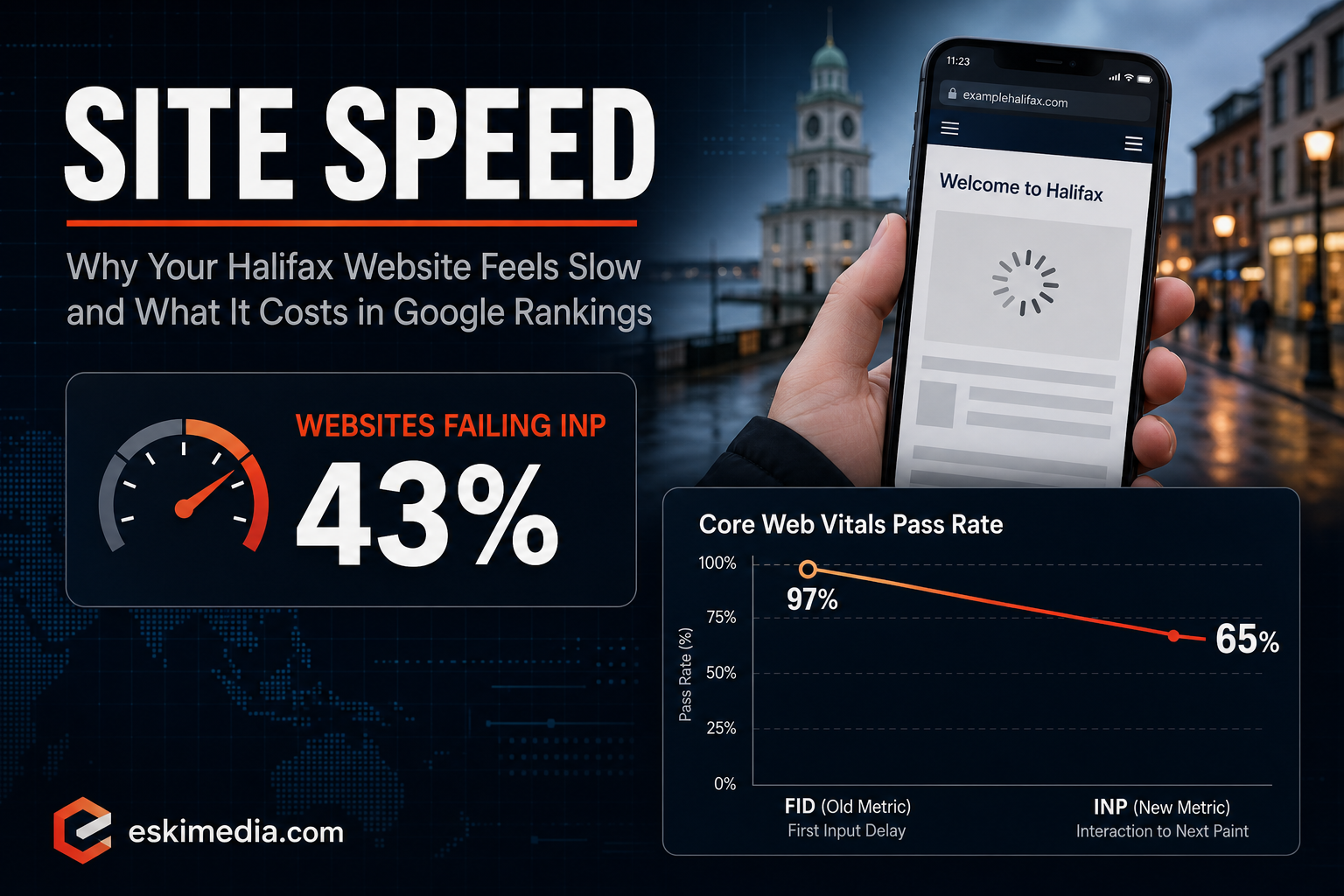
LCP and CLS are widely passed at this point. INP is where sites fall over. As of 2026, roughly 43% of websites fail the 200-millisecond INP threshold. The predecessor metric, FID, was passed by about 97% of sites; INP is passed by about 65%. That 32-point gap isn’t a change in websites. It’s a change in what’s being measured. INP captures the delay users actually feel when they tap something and nothing happens, which FID was too lenient to catch.
Worth knowing: these are measured on real Chrome users at the 75th percentile over a rolling 28-day window. Which means your own experience of your site is close to irrelevant, and so is a single test run on good hardware. Three-quarters of your visitors need a good experience, on their phones, on their connections.
What Slow Actually Costs
The rankings argument is real but usually overstated, since Core Web Vitals are a tiebreaker, not a primary factor. The conversion argument is the one that should worry you.
A 0.1-second delay is associated with about an 8% drop in conversions. Roughly every 100 milliseconds of load time costs about 1%. Somewhere between 40% and 53% of users abandon a site that loads too slowly, and mobile abandonment climbs toward 53% past the three-second mark. Only 42% of mobile sites pass all three Core Web Vitals, against 63% on desktop, and mobile is where most of your Halifax traffic is.
Run that against a small business: if your site generates 60 enquiries a month and you’re losing a third of mobile visitors before the page renders, you’re not looking at a technical problem. You’re looking at 20 lost enquiries a month, permanently, quietly.
The Four Things Usually Responsible
1. Images nobody resized
The most common problem on Halifax small business websites, by a wide margin. A photographer sends 20 images at 6000 pixels wide and 8MB each, they get uploaded straight to WordPress, and every visitor downloads all of them at full size to display at 800 pixels.
Fix: resize to the dimensions actually displayed, convert to WebP, enable lazy loading below the fold. This alone frequently takes LCP from 4 seconds to under 2, and it’s an afternoon of work rather than a rebuild.
2. Plugin accumulation
A WordPress site that’s been running five years often has 30-plus plugins, four of which are actually used. Each one may load its own CSS and JavaScript on every page, including a contact form script on pages with no form, and a slider library on pages with no slider.
Every unnecessary JavaScript file the browser has to parse is direct INP damage. This is the single biggest lever on the metric everyone’s failing.
3. Third-party scripts
Google Analytics, Tag Manager, the Meta pixel, a live chat widget, a review carousel, a booking embed, a cookie consent banner. Each is small on its own. Together they often account for more than half of a page’s JavaScript, and they’re the most common cause of a page that looks loaded but doesn’t respond to taps.
The chat widget is worth singling out. Most local businesses install one, get almost no conversations through it, and pay for it in responsiveness on every page view. Check whether yours has actually produced business before you keep it.
4. Cheap shared hosting
A $3/month plan hosting 400 sites on one server means your time-to-first-byte is a function of what everyone else’s traffic is doing. No amount of front-end optimization fixes a slow server response. Decent managed hosting is $15–30/month, and for a site that’s generating leads it’s not a sensible place to economize.
How to Find Out Where You Stand, Free
Two tools, ten minutes:
- PageSpeed Insights. Enter your URL. Ignore the score at the top; that’s a lab simulation. Look for the “Discover what your real users are experiencing” panel, which is field data from actual Chrome visitors. That’s what Google uses. If it says there’s insufficient data, your traffic is too low for CWV to be a meaningful ranking consideration anyway, and you should focus on content.
- Your own phone, off wifi. Turn off wifi, use cellular, load your site cold. Then try to tap the menu and fill in the contact form. This is unscientific and it will tell you more than any report.
Test three page types, not just the homepage: your busiest service page, a blog post, and the contact page. Homepages are usually the most optimized page on a site and the least representative.
What’s Worth Doing and What Isn’t
Order of return on effort, in our experience with WordPress sites in this market:
- Compress and resize images, convert to WebP — biggest gain, lowest risk
- Delete unused plugins, then audit what the survivors are loading where
- Enable proper caching (a good caching plugin, ideally server-level)
- Remove third-party scripts you can’t tie to results
- Move to hosting that isn’t oversold
- Set explicit width and height on images so nothing shifts as it loads — cheap CLS fix
What’s usually not worth it for a small business site: chasing a 100 score, aggressive minification that breaks your layout every time the theme updates, or a full rebuild sold on performance grounds when the existing site would be fine with a day of cleanup. We’ve talked people out of rebuilds more than once.
If You’d Rather Someone Just Looked
Performance work is diagnostic — the same symptom has five possible causes, and guessing is expensive. We handle it as part of web design and site care for Halifax businesses, and it’s usually the first thing we address on an existing site because it makes everything else — SEO, ads, social traffic — convert better.
Send us your URL and we’ll tell you what’s actually slowing it down, with numbers. Whether you fix it yourself or not is up to you.