
Lost Google Rankings After a Website Redesign: The Recovery Order That Actually Works

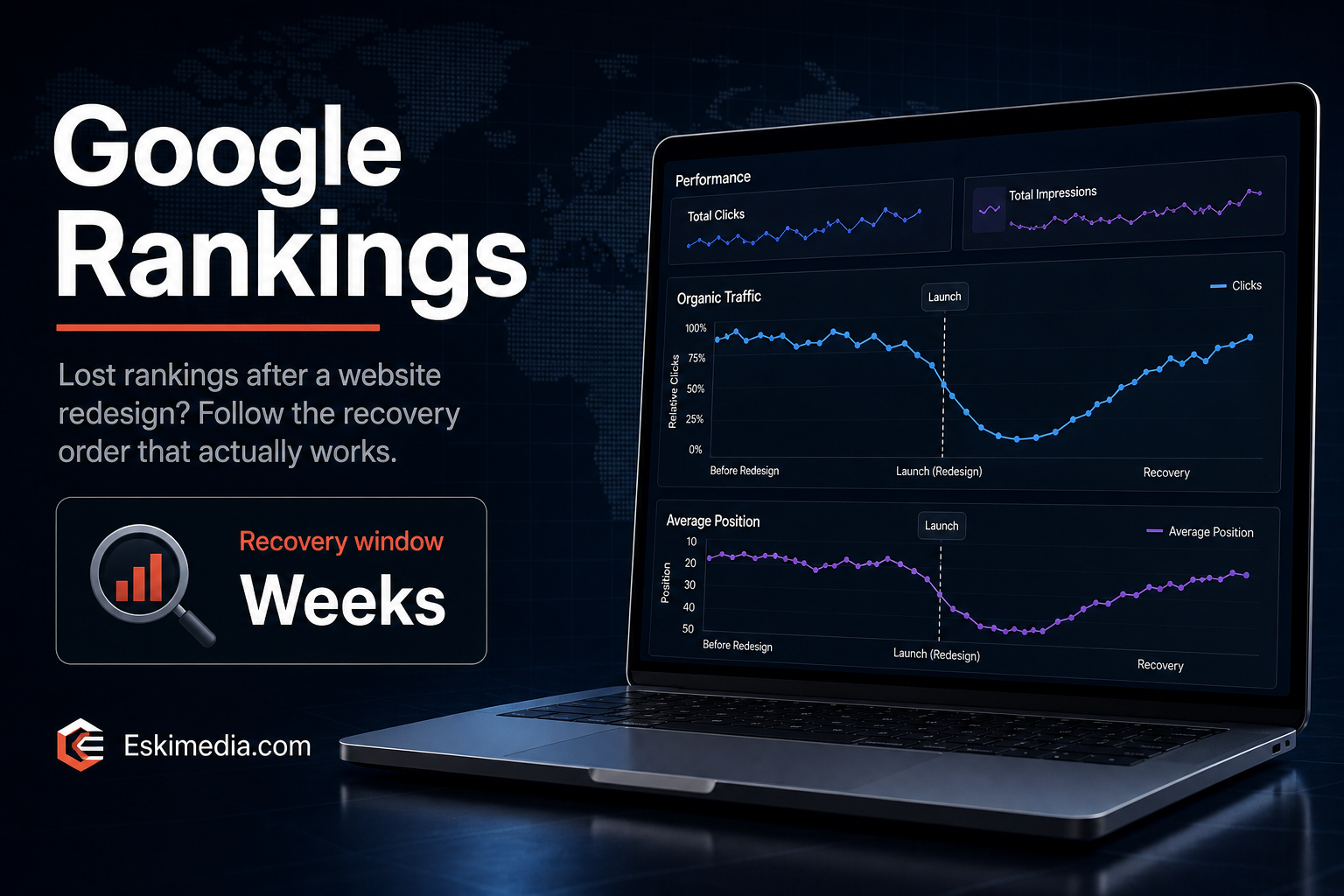
The new site looks better than the old one. The phone rings less. Search Console shows clicks sliding since launch day, and pages that used to sit on page one are nowhere.
A drop after a redesign almost always comes from a short list of launch mistakes, and most of them are fixable. The order you check them in matters, because the fastest ones to find are also the most damaging: a site accidentally hidden from Google can lose most of its search traffic within days, and it can come back within days once it’s fixed. Missing redirects and deleted content take longer.
Some movement after a launch is normal. Google’s own site-move guidance says to expect temporary fluctuation, and that it can take a few weeks or more for a medium-sized site to settle. A drop that’s still getting worse after two or three weeks is not fluctuation. Work through the steps below in order.
Step 0: Make Sure the Drop Is Real
Before touching anything, check that you’ve lost traffic and not just measurement. New themes regularly ship without the analytics tag, or with a cookie banner that blocks it.
| Google Analytics | Search Console clicks | What it means |
|---|---|---|
| Down sharply | Roughly steady | Tracking problem. The tag is missing or blocked on the new site |
| Down | Down | Real search traffic loss. Keep going |
| Steady | Down | Search is down but something else is filling the gap, often paid or direct traffic |
If you can’t get into Search Console because the old agency set it up under their account, sort that out first. Our guide on getting your domain and accounts back from a web designer covers it. Once you control the domain, you can verify Search Console yourself.
Step 1: Is the Site Blocked From Google? (Ten Minutes)
Staging sites are deliberately hidden from search engines. When the staging site becomes the live site, that setting sometimes comes with it. Check these on the live site, not staging:
- WordPress Settings → Reading. Make sure “Discourage search engines from indexing this site” is unchecked.
- yourdomain.com/robots.txt. Look for
Disallow: /on its own underUser-agent: *. That blocks everything. - Your SEO plugin. In Rank Math or Yoast, check that pages and posts aren’t set to noindex by default.
- The canonical tag. View the source of an important page and search for
canonical. It should point to your live domain, not to a staging address or the old domain. - URL Inspection in Search Console. Test your two or three most important pages. It tells you directly whether the page can be indexed and why not.
If any of these was wrong, fix it, request indexing for your main pages, and give it a week before judging anything else. This is the one fix that can reverse a drop quickly.
Step 2: Did Old URLs Get Redirected?
Redesigns often change URLs: /services/roof-repair/ becomes /roofing/, blog posts lose their date folders, a page gets merged into another. Every old URL that Google knew and that now returns a 404 page is a ranking thrown away, along with any links pointing to it.
Build the list of old URLs
- Search Console → Performance → Pages. Set the date range to the months before launch. Every page that got clicks is on this list.
- Search Console → Indexing → Pages. The “Not found (404)” group shows old URLs Google is still trying.
- The Wayback Machine at archive.org, if you have no other record of the old site’s structure.
- Your old XML sitemap, if anyone kept a copy.
Map each one to its closest new page
Use permanent (301) redirects, one old URL to its most relevant new page. Don’t send everything to the homepage. Google tends to treat redirects to an unrelated page as if the old page simply disappeared, so the rankings don’t carry over.
On WordPress, the Redirection plugin or Rank Math’s redirection module handles this without touching server files. Google’s guidance is to keep redirects for at least a year, and in practice there’s no reason to remove them at all.
Step 3: Did Content Disappear in the Redesign?
This is the quiet one. The new design is cleaner, so the long service page became three short paragraphs and a slider. The FAQ section went because it “looked cluttered”. Text that used to be on the page is now inside images.
Compare your most important old pages with the new versions. The Wayback Machine usually has copies. For each page that lost rankings, ask:
- Is the main service still described in plain text, in enough detail to answer a customer’s questions?
- Did the headings change from specific (“Asphalt Shingle Roof Replacement”) to vague (“What We Do”)?
- Did two service pages get merged into one, so neither topic has its own page any more?
- Did the page title change from something descriptive to just the business name or “Home”?
- Were location details, prices or FAQs removed?
Restore what was doing the work. The design can stay; the substance needs to come back.
Step 4: Did Pages Lose Their Internal Links?
A new menu often has fewer items. Pages that used to be one click from the homepage are now four clicks deep or only reachable through the sitemap. Old blog posts that linked to service pages may now point at 404s.
A free crawler such as Screaming Frog (up to 500 URLs on the free version) shows which pages have few or no internal links pointing at them, and which internal links are broken. Put your important service pages back in the main navigation, and fix the broken links rather than relying on redirects for your own site’s links.
Step 5: Did the New Site Get Slower or Break on Mobile?
Heavier themes, page builders, sliders and video backgrounds can make a redesign noticeably slower on phones than the site it replaced. Check your main pages in PageSpeed Insights on the mobile tab and compare with the old site if you have past scores. Our article on why a website feels slow covers the usual causes. Speed is rarely the whole story behind a big drop, but it can deepen one.
How Long Recovery Takes
| Problem | Typical recovery once fixed |
|---|---|
| Site blocked from indexing | Days to a couple of weeks, as Google recrawls |
| Missing redirects | Weeks. Longer for pages Google crawls rarely |
| Deleted or thinned content | Weeks to a few months after it’s restored |
| Weak internal linking, slower pages | Gradual, over several months |
The longer a problem sits, the longer the recovery. Old URLs that stay broken for months gradually drop out of Google’s memory, and the links pointing to them lose their value.
Before Your Next Redesign
- Crawl the old site and save the full URL list before anything changes.
- Keep URLs the same wherever you can. Change them only when there’s a real reason.
- Write the redirect map before launch, not after the drop.
- Protect the staging site with a password rather than relying only on a noindex setting.
- On launch day, run the five checks in Step 1 on the live site.
- Compare word count and headings on your top ten pages, old versus new.
If you’ve been through the checklist and can’t find the cause, or you’ve found it and need the redirects, content and technical fixes done properly, that’s a mix of SEO and website work we handle together. Send us the launch date and your domain, and we’ll start by comparing what Google knew about the old site with what it can see now.