
Why Your Google Business Profile Ranks in Halifax but Disappears in Dartmouth, Bedford or Sackville

You search for your own trade on your phone in the North End and there you are, second in the map pack. A customer searches the same thing from a kitchen in Cole Harbour and you’re nowhere. Same business. Same profile. Same afternoon.
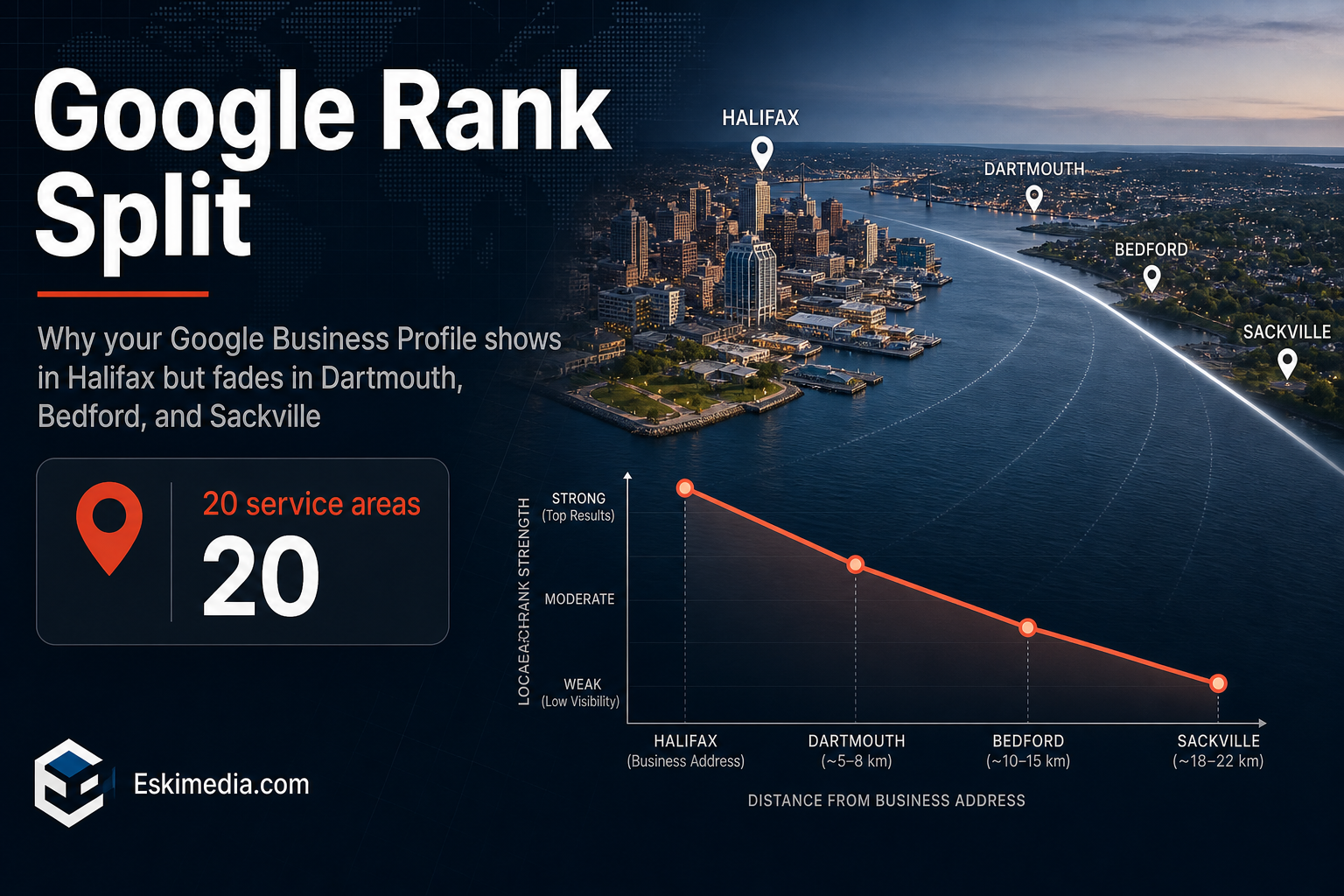
In most cases nothing is broken. Google’s local results are built to favour businesses close to the person searching, and HRM makes that effect unusually easy to see. The harbour, Bedford Basin and the 101/102 corridor split the municipality into communities that Google treats as separate places, each with its own centre point.
The short answer: your map ranking is anchored to the address you verified, and it weakens as the searcher gets further from it. Adding Dartmouth, Bedford or Sackville as service areas won’t change that. What does change it is how relevant and how well-known your business looks in those communities, and whether your website gives Google a reason to show you when someone types the community’s name.
Is It Distance, or Is Something Actually Wrong?
Rule out the look-alikes first. Distance has a recognizable pattern: you rank well near your address and fade gradually as you move away. If your pattern is different, the fix is different.
| What you’re seeing | Most likely cause | First thing to check |
|---|---|---|
| Strong near your address, weaker across the harbour or up the highway | Normal proximity effect | Keep reading. This is the problem this article solves. |
| Missing everywhere, including your own street | Profile suspended, unverified or filtered | Status and notifications in your Business Profile dashboard |
| You appear for your business name but not for “electrician” or “roofer” | Relevance: category or services don’t match the search | Your primary category against the top three businesses that do rank |
| You dropped overnight after editing your name, address or category | Edit under review or re-verification triggered | Pending edits, and our notes on what changed in Business Profile this year |
| A competitor in your building shows up and you don’t | Google filtering listings that look like near-duplicates | Whether you share an address and a category with another profile |
If you’re in the first row, carry on.
Why Google Treats Dartmouth, Bedford and Sackville as Different Places
Google says local results depend on three things: relevance, distance and prominence. Its own definition of distance is blunt. It’s “how far each business is from the customer who’s searching.” The same page adds that there’s no way to pay for a better local ranking.
That distance gets measured in two different ways depending on how people search.
- No place in the search (“plumber”, “plumber near me”). Google uses the searcher’s location, usually their phone. Someone in Dartmouth sees Dartmouth businesses first.
- A place in the search (“plumber Bedford”). Google uses Bedford as the reference point, even if the person typing is sitting downtown.
The second type matters more here than in most cities. Addresses in HRM still carry the community name: Dartmouth, Bedford, Lower Sackville. People search the way they write their address. Very few people in Bedford type “Halifax” when they’re looking for a contractor, so a business that only looks relevant to “Halifax” misses both kinds of search in Bedford at once.
Do Service Areas Help Your Google Business Profile Rank?
No. Service areas tell customers where you work. They don’t extend your ranking radius. Independent tests by Sterling Sky and Whitespark added and removed service areas on live profiles, tracked rankings on a grid, and saw no change. Your ranking stays tied to the address you verified, even when that address is hidden from the public.
Set them anyway, and set them honestly. Google allows up to 20 service areas, and the overall area shouldn’t extend more than about two hours’ drive from your base. Customers read them. Listing all of Nova Scotia makes a small operator look like a lead-generation site.
How to See Where You Actually Rank Across HRM
Your own phone is a poor instrument. It sits near your address and Google personalizes what it shows you. You need to see results from the places you’re missing.
Option 1: a geo-grid rank tracker
Tools like Local Falcon, BrightLocal and Whitespark’s Local Rank Tracker plot your map position at points on a grid around your business. For a business on the Halifax peninsula, a 7×7 grid with roughly 1.5 to 2 km between points covers the peninsula, the Dartmouth core and the southern edge of Bedford. Widen it if Sackville matters to you. The picture is usually obvious at a glance: green around your address, red across the water.
Option 2: a free spot check in Chrome
- Open Chrome, press F12, then open the three-dot menu inside DevTools and choose More tools → Sensors.
- Under Location, set a custom latitude and longitude for the spot you want to test, say a point in Dartmouth Crossing.
- Keep DevTools open, search in an incognito window, and click through to the Maps results.
It’s rougher than a tracker. Google can still infer location from your IP address. For a quick look at two or three points, though, it’s enough to confirm the pattern.
Whichever you use, test three to five searches your customers actually type, not only your main one. Save the result before you change anything. Without a baseline you won’t know what worked.
What Moves the Needle in the Communities You’re Missing
You can’t change distance. You can make your business look relevant and well-known enough that Google still shows it at the edge of your radius. You can also win the searches that name a community outright, which is where most of the opportunity sits.
Get the primary category exactly right
This is the biggest relevance lever on the profile. Run the Dartmouth search you care about and note the primary category of every business in the top three. If they all use “Roofing contractor” and you use “Contractor”, you are asking Google to rank a generalist against specialists on their home ground.
Give each community a real page on your website
For “roofer Bedford”, Google needs evidence that you actually work in Bedford. A page that swaps the town name into the same paragraph doesn’t provide it, and Google treats pages like that as doorway pages. A useful community page carries things a template can’t:
- the neighbourhoods and streets you’ve actually worked in
- the kind of jobs you do there, with photos from those jobs
- whether you charge for travel, and how you handle bridge tolls or longer drives
- typical scheduling: how soon you can usually get there
One solid page per community you truly serve beats ten thin ones. This is a large part of what our local SEO work involves for service businesses.
Build prominence where you’re weak
Prominence comes from reviews, links and mentions. Two practical moves. First, ask for reviews from the customers you already serve in Dartmouth or Sackville; don’t script what they write. Our guide to getting more Google reviews without breaking the rules covers how to ask. Second, look for local mentions on the other side of the harbour: a business association listing, a sponsorship, a supplier who links to its trade customers.
Compete in the organic results below the map
The map pack gets the attention. The regular results underneath depend much less on the searcher’s location. A strong Bedford page on your website can rank there even when your map listing can’t break into the top three.
Pay for the gap if the numbers work
Google Ads can target Dartmouth or Sackville directly, and some trades qualify for Local Services Ads, which are ranked differently from the organic map. If one community produces good jobs and organic visibility there will take months, a tightly targeted search campaign can cover it in the meantime.
What Not to Do
A few fixes circulate on forums that cost more than they return.
- Renting a virtual office or mailbox in Dartmouth. Google’s guidelines exclude virtual offices unless they’re staffed during business hours. A suspension takes your Halifax ranking down with it.
- Adding “Dartmouth” or “Bedford” to your business name. Unless it’s your real, signed business name, it’s a violation. Competitors report it, and Google does act on those reports.
- A second profile for a place you don’t staff. Same risk as the virtual office, with extra paperwork.
- Dragging the pin toward the harbour. The pin should sit where the business actually is. Moving it can trigger re-verification.
If you genuinely open a staffed location in Dartmouth, a second profile is legitimate. That’s a business decision, though, not a ranking trick.
What’s Realistic
If your base is on the peninsula and a comparable competitor is based in Dartmouth, you’ll rarely beat them in the Dartmouth map pack for a “near me” search made in Dartmouth. That is how the system is meant to work.
What you can realistically win is different. Community-name searches. Map visibility at the edge of your radius. Organic rankings for your community pages. Ads where the jobs justify it. A category fix is usually the fastest change to show up in a grid. Reviews and local mentions build slowly, so check the grid monthly rather than daily.
Two Questions That Come Up Every Time
Should I list Halifax as a service area if my business is based in Halifax?
Yes. It doesn’t affect ranking either way, but leaving your own city out makes the service area shown to customers look strange.
I work from home. Do I have to show my address?
No. If customers don’t come to you, hide the address and list service areas instead. Google still uses the verified address to anchor your ranking; it just isn’t displayed. Our step-by-step setup guide walks through that choice.
If you run a grid and the pattern doesn’t look like a normal fade with distance, say you’re weak right next to your own address or you dropped overnight, that points to a profile problem rather than geography, and it’s worth an outside look. When we take on a local SEO client, this map of where they rank across HRM is the first thing we build. It decides which communities deserve a page, which need a review push, and which are cheaper to cover with ads. If you’d like that map for your business, get in touch.